5D Chess With Multiverse Time Travel
Chess variant with time-travel moves and branching timelines
Conor Petersen, Thunkspace, LLC · Released Jul 22, 2020
- Reviews
- Overwhelmingly Positive
- 97% of 8,606
- Recent reviews
- Very Positive
- 98% of 51 in 30 days
- Players
- 22
- daily peak, Nov 7, 2026
- Steam Deck
- Playable
- Last update on Steam
- 5 years ago
- Nov 4, 2021
What is 5D Chess With Multiverse Time Travel?
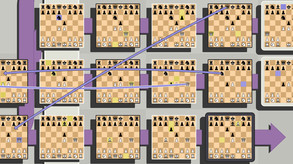
This turn-based chess variant lets you move pieces through time and across parallel timelines as you try to checkmate your opponent. You can play matches against AI or other players, choose different starting positions, and solve puzzles built around the timeline rules.
For you if...
- +you enjoy figuring out unusual chess rules
- +you like solving puzzles with branching timelines
- +you want to play a chess variant online
Not for you if...
- −you prefer familiar chess rules and conventional moves
- −you dislike tracking multiple timelines during a match
What players say
97% of 8,606 reviews are positive · 98% of 51 in the last 30 days
Players praise the unusual interactions between chess moves and branching timelines, and some enjoy the puzzles. The most common complaint is that the rules are difficult to learn from the in-game guide; others find AI matches frustrating or say the novelty wears off quickly.
Players over time
▼ -42% vs a month agoPlayers online on Steam, one sample a day.
Highest since Sep 2026: 33 players on Oct 4, 2026.
Show the data
| Day | Players |
|---|---|
| Nov 7, 2026 | 22 |
| Nov 6, 2026 | 10 |
| Nov 5, 2026 | 9 |
| Nov 4, 2026 | 10 |
| Nov 3, 2026 | 13 |
| Nov 2, 2026 | 8 |
| Nov 1, 2026 | 13 |
| Oct 31, 2026 | 10 |
| Oct 30, 2026 | 9 |
| Oct 29, 2026 | 13 |
| Oct 28, 2026 | 5 |
| Oct 27, 2026 | 15 |
| Oct 26, 2026 | 17 |
| Oct 25, 2026 | 18 |
| Oct 24, 2026 | 19 |
| Oct 23, 2026 | 16 |
| Oct 22, 2026 | 15 |
| Oct 21, 2026 | 23 |
| Oct 20, 2026 | 19 |
| Oct 18, 2026 | 17 |
| Oct 17, 2026 | 12 |
| Oct 16, 2026 | 12 |
| Oct 15, 2026 | 17 |
| Oct 14, 2026 | 16 |
| Oct 13, 2026 | 11 |
| Oct 11, 2026 | 23 |
| Oct 10, 2026 | 25 |
| Oct 9, 2026 | 20 |
| Oct 8, 2026 | 25 |
| Oct 7, 2026 | 22 |
| Oct 6, 2026 | 21 |
| Oct 4, 2026 | 33 |
| Oct 3, 2026 | 16 |
| Oct 2, 2026 | 16 |
| Oct 1, 2026 | 13 |
| Sep 30, 2026 | 16 |
| Sep 29, 2026 | 15 |
| Sep 27, 2026 | 18 |
| Sep 26, 2026 | 18 |
| Sep 25, 2026 | 19 |
| Sep 24, 2026 | 18 |
| Sep 23, 2026 | 6 |
| Sep 23, 2026 | 9 |
| Sep 22, 2026 | 15 |
Screenshots and trailer
5D Chess With Multiverse Time Travel system requirements
Minimum: OpenGL 3.3 compatibility …, 0.5 GB RAM, 0.1 GB of disk space.
As published by the developer.
Can my PC run 5D Chess With Multiverse Time Travel?
Tell us your graphics card once and every game page will answer this for you.
Set up my PC →Minimum
- OS
- Windows 10, 8.1, 8, or 7. 64-bit.
- Processor
- 2Ghz or better.
- Graphics
- OpenGL 3.3 compatibility (everything since about 2010).
- Memory
- 512 MB RAM
- Storage
- 50 MB available space
Recommended
Requires a 64-bit processor and operating system
Does 5D Chess With Multiverse Time Travel have co-op or multiplayer?
Yes: PvP online and split-screen. It also has a single-player mode. With Remote Play Together, one copy is enough to play the local modes online with friends.
Does 5D Chess With Multiverse Time Travel run on Steam Deck?
Playable Playable: it runs on Steam Deck with some adjustments.
- Sometimes shows mouse, keyboard or non-Deck controller icons
- All functionality is accessible with the default controller configuration
- In-game text is legible on Steam Deck
- Default graphics settings perform well on Steam Deck
PC version details
- DRM
- None declared on Steam
- Controller
- Keyboard and mouse
- Platforms
- Windows, macOS, Linux
- Steam features
- Family Sharing
- Languages
- Text only: English.
Does 5D Chess With Multiverse Time Travel use AI-generated content?
No AI-generated content is disclosed on the game's Steam page.
Self-reported by the developer under Steam rules: it covers AI content that ships in the game, not tools used to make it. Steam page checked on Oct 25, 2026. How to filter AI games on Steam
Tags
- Chess
- Time Travel
- Time Manipulation
- Board Game
- Difficult
- Puzzle
- Multiplayer
- Turn-Based Strategy
- Strategy
- Psychological
- Turn-Based Tactics
- Singleplayer
- PvP
- Indie
- Artificial Intelligence
- Psychedelic
Recent updates
- Nov 4, 2021 · Tiny Bugfix Update
- Oct 7, 2020 · Feature and Content Update! Clocks, Guide, Puzzles, Pieces, Variants!
- Sep 18, 2020 · New variants, other small patches, and future plans.
- Jul 27, 2020 · More bugs fixed, more community guides.
- Jul 24, 2020 · Community guide, Windows 7/8/8.1 support, and the first round of bug-fixes.