Gizmos: Interstellar Voyage
Casual nonogram puzzles across ten colorful outer-space planets
Oleg Sereda · Released Jan 28, 2021
- Reviews
- Positive
- 100% of 18
- Recent reviews
- Not enough recent
- Players
- 1
- daily peak, Nov 7, 2026
- Steam Deck
- Unsupported
- Last update on Steam
- 5 years ago
- Sep 12, 2021
What is Gizmos: Interstellar Voyage?
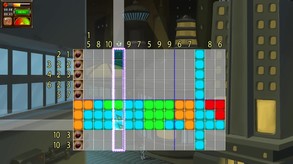
A single-player, 2D puzzle game set across ten planets, where you solve colored or monochrome nonograms in timed or relaxed modes and complete jigsaw minigames. Its story follows the Gizmos on an interstellar journey.
For you if...
- +you enjoy number-based nonograms in color or monochrome
- +you prefer choosing between timed and relaxed play
- +you also enjoy solving jigsaw minigames
Not for you if...
- −you want action instead of number-based puzzle solving
- −you need multiplayer or cooperative modes
Screenshots and trailer
Gizmos: Interstellar Voyage system requirements
Minimum: 1 GB RAM, 1.3 GB of disk space.
As published by the developer.
Can my PC run Gizmos: Interstellar Voyage?
The published requirements do not name a graphics card we can compare.
Set up my PC →Minimum
- OS
- Windows 7 or newer
- Processor
- 1.6 GHz
- Memory
- 1024 MB RAM
- Storage
- 1322 MB available space
- DirectX
- Version 8.0
Does Gizmos: Interstellar Voyage have co-op or multiplayer?
No: single-player only, no multiplayer modes declared.
Does Gizmos: Interstellar Voyage run on Steam Deck?
Unsupported No: Valve rates it Unsupported on Steam Deck.
- Not supported on SteamOS
PC version details
- DRM
- None declared on Steam
- Controller
- Keyboard and mouse
- Platforms
- Windows
- Achievements
- 27
- Steam features
- Cloud saves, Family Sharing
- Languages
- Full audio: English. Text only: French, German, Russian.
Does Gizmos: Interstellar Voyage use AI-generated content?
No AI-generated content is disclosed on the game's Steam page.
Self-reported by the developer under Steam rules: it covers AI content that ships in the game, not tools used to make it. Steam page checked on Oct 25, 2026. How to filter AI games on Steam


