VIDEOBALL
Arcade sports where triangle shots push balls into opposing goals
Action Button Entertainment, LLC · Published by Iron Galaxy Studios · Released Jul 12, 2016
- Reviews
- Very Positive
- 90% of 172
- Recent reviews
- Not enough recent
- Players
- 0
- daily peak, Oct 30, 2026
- Steam Deck
- Verified
- Last update on Steam
- 10 years ago
- Sep 9, 2016
Metacritic: 82/100 (critic reviews)
What is VIDEOBALL?
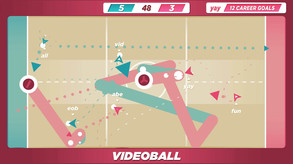
VIDEOBALL is an arcade sports game played in arena matches. You maneuver and fire triangles, charging for larger shots with more pushing power. Shots can also stun opponents or cancel incoming triangles, and local matches let you adjust ball counts, time limits, and point values.
For you if...
- +you want competitive sports matches with friends sharing a screen
Not for you if...
- −you want a realistic simulation of an established sport
What players say
90% of 172 reviews are positive
Players praise the tactical depth of the simple mechanics and the soundtrack. A recent negative review argues that the chaos gets in the way of competitive play.
Screenshots and trailer
VIDEOBALL system requirements
Minimum: HD 4000, 2 GB RAM, 0.2 GB of disk space.
As published by the developer.
Can my PC run VIDEOBALL?
Tell us your graphics card once and every game page will answer this for you.
Set up my PC →Minimum
- OS
- Windows XP
- Processor
- Core 2 Duo
- Graphics
- Intel HD 4000
- Memory
- 2 GB RAM
- Storage
- 200 MB available space
- DirectX
- Version 9.0c
- Notes
- Two-, four-, or six-player local multiplayer requires at least one, three, or five controller(s) (respectively) with at least one directional input implement (digital or analog) and two buttons each (one button is action; the other button will pause the game).
Recommended
- OS
- Windows 7
- Processor
- Core i5
- Graphics
- NVIDIA GeForce GTX 460 or AMD Radeon HD6850
- Memory
- 4 GB RAM
- Storage
- 200 MB available space
- DirectX
- Version 9.0c
- Notes
- We strongly recommend not playing with a keyboard. We strongly recommend playing with controllers with analog sticks, a directional pad, at least one face button, a start button, shoulders, and triggers. (All directional implements will perform player movement; the start button will pause the game; all buttons will perform the same game action.) For two-, four-, and six-player local multiplayer, we recommend two, four, or six controllers (respectively), each of which have analog sticks, a directional pad, at least one face button, a start button, shoulder buttons, and triggers. (All directional implements will perform player movement; the start button will pause the game; all other buttons will perform the same game action.)
Does VIDEOBALL have co-op or multiplayer?
Yes: co-op (mode not specified). It also has a single-player mode. With Remote Play Together, one copy is enough to play the local modes online with friends.
Does VIDEOBALL run on Steam Deck?
Verified Yes, Verified by Valve: it works on Steam Deck out of the box.
- All functionality is accessible with the default controller configuration
- In-game text is legible on Steam Deck
- Default graphics settings perform well on Steam Deck
PC version details
- DRM
- None declared on Steam
- Controller
- Full controller support
- Platforms
- Windows
- Achievements
- 19
- Steam features
- Family Sharing
- Languages
- Full audio: English. Text only: French, Italian, German, Spanish - Spain, Swedish.
Does VIDEOBALL use AI-generated content?
No AI-generated content is disclosed on the game's Steam page.
Self-reported by the developer under Steam rules: it covers AI content that ships in the game, not tools used to make it. Steam page checked on Oct 27, 2026. How to filter AI games on Steam


