WolfQuest: Classic
Wolf survival simulation in Yellowstone about hunting and raising pups
eduweb · Released Jul 22, 2025
Third-party account required
- Reviews
- Very Positive
- 90% of 1,692
- Recent reviews
- Not enough recent
- Players
- 1
- daily peak, Nov 7, 2026
- Steam Deck
- Playable
- Last update on Steam
- 1 year ago
- Mar 31, 2025
What is WolfQuest: Classic?
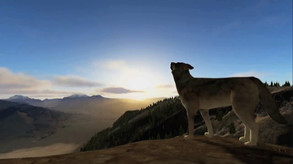
A wildlife simulation set in Yellowstone National Park, where you play a young gray wolf leaving its birth pack. You hunt, find a mate, establish territory, and feed and protect pups as you travel from Amethyst Mountain to Slough Creek.
For you if...
- +you enjoy learning about wolf survival through play
- +you prefer a simpler wolf simulation with shorter playthroughs
Not for you if...
- −you want to play alongside other wolves online
- −you want a longer, more varied wolf life simulation
What players say
90% of 1,692 reviews are positive
Players praise the straightforward wolf-raising gameplay, often recalling it from childhood. They complain about the loss of multiplayer, repetitive play, awkward controls, and glitches; several prefer Anniversary Edition.
How many players finish WolfQuest: Classic?
11% of Steam players have unlocked «Survival of the Pack», the achievement for finishing the main story.
Share of everyone who owns the game on Steam, including those who barely played it. Updated weekly.
Screenshots and trailer
WolfQuest: Classic system requirements
Minimum: HD 3670, 4 GB RAM, 2 GB of disk space.
As published by the developer.
Can my PC run WolfQuest: Classic?
Tell us your graphics card once and every game page will answer this for you.
Set up my PC →Minimum
- OS
- Windows Vista
- Processor
- Dual Core Pentium i3
- Graphics
- Intel 4000, NVIDIA 6800 Ultra, or ATI HD 3670 (These are for WolfQuest 2.7 only, the new game WQ:AE has higher graphics requirements)
- Memory
- 4 GB RAM
- Storage
- 2 GB available space
- DirectX
- Version 9.0
Recommended
- OS
- Windows 7
- Processor
- Dual Core Pentium i3
- Graphics
- NVIDIA GeForce 640 series or AMD Radeon HD 6670 (These are for WolfQuest 2.7 only, the new game WQ:AE has higher graphics requirements)
- Memory
- 4 GB RAM
- Storage
- 4 GB available space
- DirectX
- Version 9.0
Does WolfQuest: Classic have co-op or multiplayer?
No: single-player only, no multiplayer modes declared.
Does WolfQuest: Classic run on Steam Deck?
Playable Playable: it runs on Steam Deck with some adjustments.
- Default controller config not fully functional
- Sometimes shows mouse, keyboard or non-Deck controller icons
- Some text entry requires manually opening the on-screen keyboard
- Some in-game text is small and may be hard to read
- Default graphics settings perform well on Steam Deck
PC version details
- DRM
- None declared on Steam
- Third-party account
- WolfQuest (Supports Linking to Steam Account)
- Controller
- Keyboard and mouse
- Platforms
- Windows, macOS
- Achievements
- 105
- Steam features
- Family Sharing
- Languages
- Text only: English.
Does WolfQuest: Classic use AI-generated content?
No AI-generated content is disclosed on the game's Steam page.
Self-reported by the developer under Steam rules: it covers AI content that ships in the game, not tools used to make it. Steam page checked on Oct 25, 2026. How to filter AI games on Steam
Tags
- Simulation
- RPG
- Survival
- Singleplayer
- Multiplayer
- Realistic
- Education
- Exploration
- Family Friendly
- Nature
- Action
- Hunting
- Action RPG
- Co-op
- Life Sim
- Action-Adventure
Recent updates
- Mar 31, 2025 · Multiplayer Shut Down on WolfQuest Classic (v2.7)
- Oct 26, 2019 · WolfQuest: Anniversary Edition v1.0.1 with new animal behaviors!
- Jul 25, 2019 · Release for Early Access: Update
1 DLC available.


